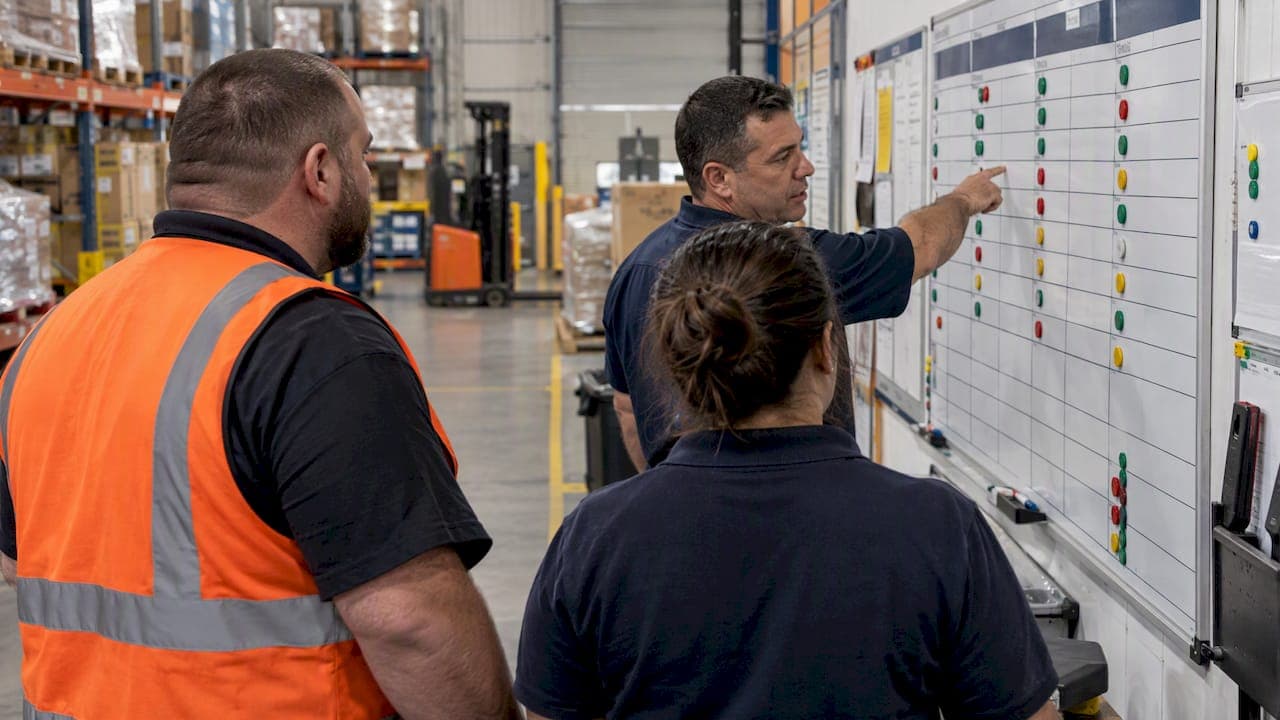
A visual management board is a daily-management tool that makes problems and a small set of team-controllable KPIs visible at a glance, so issues get caught and escalated faster and owners stay accountable. The board only works when it's paired with a timeboxed daily huddle and clear update ownership. Skip either piece and the board turns into wallpaper.
TL;DR:
- Track only metrics the team can control, with targets, status, ticket owners, escalation rules, and update dates; refresh the board as often as work changes.
- Keep daily huddles to five minutes or less; assign ticket owners and due dates, then escalate overdue or uncontrollable issues to the next tier.
- Small teams working together on stable tasks can start with a physical board; distributed teams or data already held in software may favor digital displays.
- Pilot one team first; after 60 to 90 days, remove metrics that do not guide decisions and move recurring issues to an improvement board.
Table of Contents
- What Is a Visual Management Board in a Daily Management System
- Types of Visual Boards and When to Use Each
- Core Elements and the KPIs Worth Displaying
- Running the Daily Huddle: Cadence, Roles, and Decision Rules
- Board Design: Daily and Weekly Template Layouts
- Common Mistakes That Turn Boards Into Decoration
- A 60 to 90 Day Rollout Plan for a New Board
- Connecting the Board to Systems You Already Run
- Choosing the Right Board Format for Your Team
- Training Teams to Use the Board as a Daily Habit
- Customizing Boards Across Departments
- Keeping the Board Alive Past the First Month
- What Most Advice on Visual Boards Gets Wrong
- FAQ
- Sources
- Bringing Daily Management Into Your Operation
What Is a Visual Management Board in a Daily Management System
A visual management board exists to reveal abnormalities so teams can move from noticing a problem to solving it, not just admiring it. According to Lean Enterprise Institute, a board that never triggers a countermeasure conversation is failing at its one job.
The strongest implementations connect daily boards to weekly and monthly reviews through a KPI tree, so a frontline number on a shop floor board rolls up into the metric a VP of operations reports to leadership. We've written about this connection in more detail in our guide to cascading KPIs.
VA system research found that integrating boards into daily huddles shifts conversations toward structured, data-driven check-ins and increases staff ownership of problems. In practice, this means:
- Daily boards track today's abnormalities and immediate fixes.
- Weekly boards track recurring issues that need a short project.
- Monthly reviews connect both levels back to strategic targets.
Types of Visual Boards and When to Use Each
Not every team needs the same board. The right type depends on what you're trying to see and how often it changes.
- Daily huddle board: shows today's status, tickets, and owners, reviewed every shift or every morning.
- WIP board: tracks work-in-progress limits and flow, useful where work queues up (kanban-style systems).
- Heijunka board: levels production or workload across a period, common in manufacturing scheduling.
- Obeya: a dedicated thinking space for deeper problem solving, not a daily control tool. Lean Enterprise Institute warns that conflating an obeya with a daily board causes dysfunction, since one is built for stability checks and the other for sustained investigation.
- Digital displays: pull live data from existing systems, trading manual update effort for setup complexity.
Physical boards win on visibility and ease of update near the work. Digital boards win when data already lives in a system and manual re-entry would waste time.
Core Elements and the KPIs Worth Displaying
A board earns its keep only when it shows metrics the team in front of it can actually move. Pick floor-controllable indicators, safety near-misses, quality defects, on-time delivery, readiness items, rather than financial figures a frontline team can't influence.
Each metric row needs a consistent set of fields:
- The metric name and its target.
- Current status, usually a red or green visual cue.
- Open tickets or quick-hits tied to that metric.
- An owner's name and an escalation column for anything stuck past a set time.
- The date of the last update.
Even a strong board decays without this discipline: Children's Mercy guidance found that simple red and green magnets let anyone recognize an abnormality instantly, which only works if the board is updated as often as the work changes. A board reviewed once a week with daily-changing data will mislead the team faster than no board at all.
Tie each metric back to the KPI tree so a floor supervisor can trace a number up to the goal it supports. Our 90-day KPI ownership plan walks through assigning owners to metrics that currently have none.
Running the Daily Huddle: Cadence, Roles, and Decision Rules
The huddle is where the board becomes a tool instead of a poster. Children's Mercy recommends keeping huddles centered on a simple board to five minutes or less, which forces the team to focus on what changed rather than re-reading the whole board every time.
- The shift lead or supervisor opens the huddle and reads status for each metric row.
- The team flags any new tickets, assigns an owner, and sets a due date on the spot.
- Anything still open past its due date or beyond the team's control gets escalated to the next tier.
- The lead closes with a quick confirmation of who owns what before everyone returns to work.
Decide in advance what counts as a quick hit (fixable within a shift), what gets parked for a weekly board, and what triggers escalation. Without that rule, every huddle turns into a debate about priority instead of a status check.
Pro Tip: Put the escalation rule in writing on the board itself, so a new team member can run the huddle correctly on day one.
Board Design: Daily and Weekly Template Layouts
A daily board and an improvement board solve different problems, so they need different layouts. IHI/Upstate's visual management toolkit offers example layouts for both, along with PDSA cycles for refining either one.
- Daily board: top-line KPIs across the top, a red or green status row beneath, a tickets or quick-hits section, and an owner column.
- Improvement board: run charts showing trends, a project charter section, a Pareto area for ranking causes, and a longer review cadence, usually weekly or biweekly.
- Prototype with PDSA cycles rather than designing the perfect board up front.
- Favor easy-update media like dry-erase surfaces and magnets over anything that slows the team down.
| Board type | Primary content | Typical review cadence |
|---|---|---|
| Daily huddle board | KPIs, status, tickets, owners | Daily, five minutes or less |
| Improvement board | Run charts, charters, Pareto analysis | Weekly or biweekly |
Common Mistakes That Turn Boards Into Decoration
Most failed boards share the same three problems, and each has a direct fix.
- Too many metrics: pick the small set the team can actually control, and cut anything nobody acts on.
- No huddle discipline: assign a standing owner to run the huddle and treat it as standard work, not an optional check-in.
- Blame instead of problem solving: Lean Enterprise Institute points to a "bad news first" posture, where surfacing a problem early is rewarded rather than punished, as the difference between a board that teaches and one everyone learns to avoid.
A 60 to 90 Day Rollout Plan for a New Board
A board rollout works best as a short, staged plan rather than a single launch event.
- Define the board's purpose, pick a small set of controllable KPIs, and choose a visible location and an owner.
- Build a simple prototype, run the daily huddle, and collect feedback using a PDSA cycle, as IHI/Upstate recommends.
- Stabilize who updates the board and when, define clear escalation rules, and write the standard work down so it survives staff turnover.
- Days 60 to 90: review which metrics are actually driving decisions, move any sustained, recurring issue to an improvement board, and refine how the board's KPIs map to the KPI tree.
Pro Tip: Run a deliberate pilot with one team before rolling the format out company-wide. A board that fails quietly in one area is cheap to fix; a format rolled out everywhere at once is not.
Connecting the Board to Systems You Already Run
A board that lives apart from your existing meetings, scorecards, and reporting tools becomes one more thing to maintain rather than a lens on the work you're already doing. Start by mapping the board's metrics to whatever reporting already feeds leadership, so the daily number on the wall is the same number that shows up in a monthly review, not a parallel version someone has to reconcile later.
Where metrics already live in a system of record, like a scheduling tool, a quality tracker, or a CRM, pull the number onto the board rather than recreating it by hand. Our guide to operational dashboards covers when it makes sense to surface a live feed versus keeping the entry manual.
Fold the board into your existing management operating system rather than treating it as a separate initiative. If supervisors already run a daily production meeting, the board becomes the agenda for that meeting instead of an extra stop. Our management operating system guide covers the cadence and standardized work that keeps a board embedded in routines that already exist. The goal is one rhythm, not two competing ones.
Choosing the Right Board Format for Your Team
A small, co-located team with stable work usually does better with a physical dry-erase board than with a digital dashboard. The format costs almost nothing, updates take seconds, and everyone sees the same thing standing in the same room.
Larger or distributed teams, or teams where the underlying data already lives in software, tend to outgrow a physical board quickly. A practical guide to real-time KPI dashboards covers how to pull live figures into a digital board without manual re-entry, which matters once a team is pulling numbers from multiple systems rather than counting them by hand.
Maturity matters as much as size. A team running its first board should start physical and simple, since a digital tool adds setup and maintenance overhead before anyone has proven the habit of checking the board daily. Once the daily huddle is a fixed habit and the KPIs are stable, moving select metrics to a digital or hybrid format becomes a reasonable next step rather than a leap of faith.

Training Teams to Use the Board as a Daily Habit
A board rollout succeeds or fails on whether the team treats using it as part of the job, not as an add-on task. Start training with the huddle itself: walk through exactly who reads which row, how a ticket gets written up, and what triggers escalation, using a real example from the team's own work rather than a generic sample.
New hires should see the board as part of orientation, with someone explaining what each color and column means before they start using it. Keep the explanation to the handful of fields that matter: metric, target, status, owner, and escalation, since a long training session on a simple tool defeats the purpose of keeping it simple.
Reinforce the habit through leadership presence. When a supervisor shows up to the huddle consistently and asks pointed questions about open tickets, the team learns the board matters. When leadership skips huddles, the team learns it doesn't.
Customizing Boards Across Departments
A warehouse board and a sales team board will never look identical, because the controllable metrics differ by function. A warehouse or production board typically centers on safety incidents, on-time shipments, and defect counts, with tickets tied to specific equipment or line issues.
A customer service or support team's board might track response time, open ticket backlog, and escalation count instead, with owners assigned by queue rather than by machine. A sales team's daily board tends to focus on activity metrics, calls made, demos booked, pipeline moved, since revenue itself lags too far behind daily actions to be useful on a five-minute huddle.
What stays constant across every department is the structure: a small set of controllable metrics, a status indicator, a tickets section, an owner column, and an escalation rule. The content changes by function; the discipline around updating and reviewing it should not.
Keeping the Board Alive Past the First Month
Most boards don't fail at launch, they fade a few months in once the novelty wears off and the huddle starts getting skipped. The fix is less about the board itself and more about treating the huddle as standard work that survives staff turnover, schedule changes, and a busy week.
Rotate who leads the huddle occasionally so it doesn't depend on one person's habits, but keep the format and the escalation rules fixed so the routine itself never changes. Review the metrics themselves every few months. Lean Enterprise Institute notes that a board only stays actionable when leadership standardized work keeps reinforcing it, otherwise it slides into passive decoration no matter how well it was designed.
Celebrate closed tickets as visibly as you flag new ones. A board that only ever shows new problems, with no sense of what got resolved, starts to feel like a scoreboard the team is always losing.
What Most Advice on Visual Boards Gets Wrong
Most guidance on visual boards treats the board itself as the solution, when the board is really just the visible surface of a management habit. We've seen the same pattern across operations teams: leadership invests in a nicely designed board, skips the huddle discipline behind it, and wonders a few months later why the board stopped changing.

The conventional advice oversells the design, color scheme, and software choice, and undersells the five-minute daily routine that actually makes the board work. A dry-erase board with inconsistent huddles will underperform a plain spreadsheet reviewed religiously every single day.
If you're starting from zero, prioritize the routine before the format. Pick a small set of controllable metrics, assign an owner to each, and run the huddle consistently before you touch the layout. The KPI tree connection matters too, but only once the daily habit is solid enough to support it. Boards don't fail because they're ugly. They fail because nobody showed up.
— David
FAQ
What is meant by visual management?
Visual management is a daily-operations approach that uses visible signals, like color-coded boards, charts, and status indicators, to make problems and performance instantly obvious to anyone looking. Its purpose is to speed up problem awareness so teams move to solving issues faster than they would with reports alone.
What are the different types of visual boards?
Common types include daily huddle boards for shift-level status, work-in-progress (WIP) boards for tracking flow, heijunka boards for leveling workload, and obeya spaces for deeper team problem solving. Digital displays also function as visual boards when they pull live data from existing systems.
What are visual control boards used for?
Visual control boards surface a small set of team-controllable metrics, open issues, and ownership so problems get caught and escalated quickly rather than discovered late. VA health system research found they also shift team conversations toward structured, data-driven check-ins and increase staff ownership of improvement work.
What is a VM board?
A VM board, short for visual management board, is a physical or digital display that tracks a handful of key metrics alongside their targets, current status, and assigned owners. It's built to be reviewed during a short daily huddle rather than read in isolation.
How much does it cost to get help setting up a visual management system?
Setup support varies by scope and provider. For context, our 90-Day Operations Audit is priced at 3500 USD as a one-off engagement and can include help establishing daily management routines and board design as part of the broader diagnostic.
Sources
Bringing Daily Management Into Your Operation
Most teams don't need a better-looking board, they need the routine, ownership, and escalation rules that make any board worth updating. That's the gap between a board that sits on a wall and one that actually changes how fast problems get solved.
Our 90-Day Operations Audit maps your current people, processes, and performance systems against your stated goals, then hands your team a prioritized action plan built to be used on the floor, not filed in a drive. For teams that need ongoing support turning a new board and huddle cadence into a lasting habit, our Continuous Improvement engagements build the scorecards and meeting cadences that keep the practice alive after the initial rollout.
If you're not sure which starting point fits, a Paid Discovery Call at $500 is a low-commitment way to talk through where your daily management gaps actually are before committing to a larger engagement.