
Field service scheduling is the deliberate coordination of technicians, job assignments, and route planning to maximize resource use and deliver service on time. Get it wrong and the consequences stack fast: missed appointments, repeat visits, technician burnout, and customers who don't call back. Get it right and you turn a dispatcher's whiteboard into a competitive advantage.
The core problems poor scheduling creates:
- Lost revenue from double-bookings and idle technician time
- Customer churn driven by late arrivals and no-shows
- Technician frustration when skills are mismatched to jobs
- Billing delays when scheduling lives apart from invoicing
- No visibility into field status until something breaks
Proactive scheduling shifts operations from reactive dispatching to asset-driven maintenance, catching equipment failures before they become emergency calls. Skill-based technician matching reduces callbacks. And integration with CRM, invoicing, and inventory turns a scheduling tool into an operational backbone.
What modern field service scheduling software actually does
The gap between a shared Google Calendar and purpose-built scheduling software is wider than most managers expect. Modern platforms handle the full complexity of field operations in one place.
Core capabilities you should expect:
- Drag-and-drop dispatch boards with four view modes: calendar, timeline, resource, and map
- Skill-based technician matching that assigns work by required skills, preferred skills, and job history
- Route optimization to cut drive time and fit more jobs into each technician's day
- Conflict detection that flags double-bookings and skill mismatches before they go live
- GPS tracking for live technician location and late-risk signals
- Automated customer notifications including on-the-way SMS with live tracking links
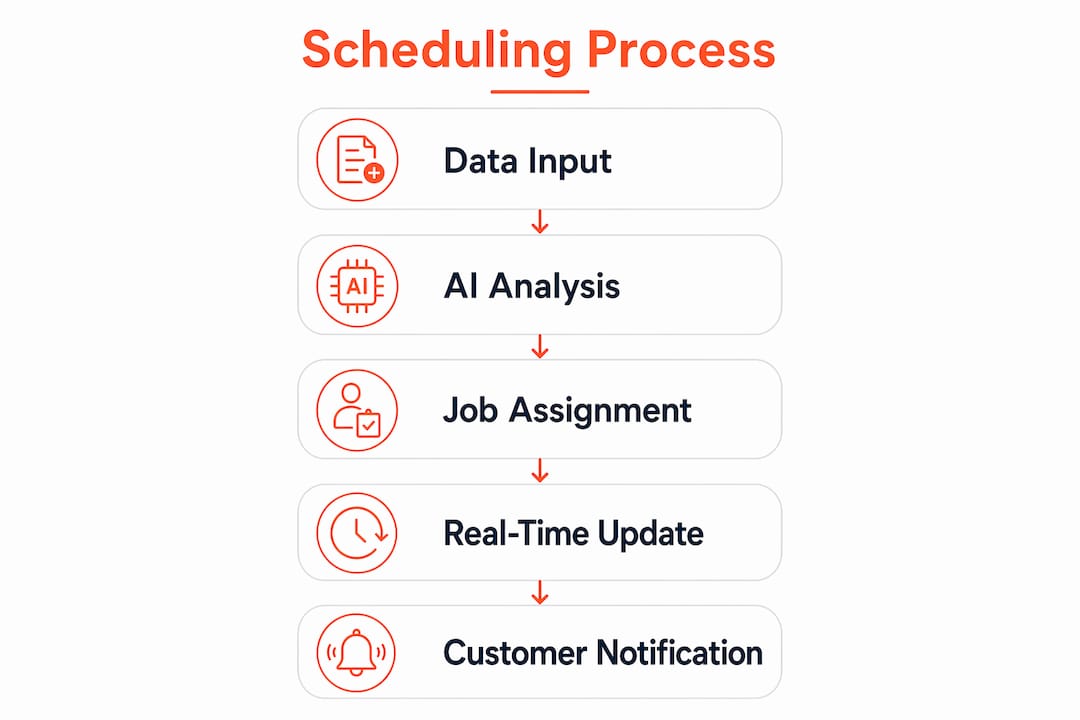
- AI-assisted dispatch that queues scheduling suggestions for dispatcher approval rather than auto-assigning without oversight
That last point matters. AI-assisted scheduling accelerates planning while keeping a human in the decision seat. Assist mode means the system proposes the full day's assignments by skill, zone, and capacity, and a dispatcher approves before anything goes live. That balance of speed and control is where most operations find the most value.
Why siloed scheduling quietly kills your operation

Siloed spreadsheets remain the single biggest mistake field service businesses make. They feel manageable until you hit 10 technicians, three job types, and a customer who calls to reschedule. Then they collapse.
| Factor | Siloed scheduling | Integrated scheduling |
|---|---|---|
| Data accuracy | Manual, error-prone | Single source of truth |
| Billing speed | Delayed, disconnected | Auto-triggered on job close |
| Customer visibility | Phone calls only | Automated notifications |
| Dispatcher workload | High, repetitive | Reduced by automation |
| Scalability | Breaks under growth | Designed for it |
Integration with invoicing, CRM, and inventory creates a workflow where a closed job triggers an invoice, updates the customer record, and flags parts used. Benefits of that connected approach:
- Dispatchers see real-time technician availability without calling the field
- Billing happens faster because job data flows directly to invoicing
- Customer history informs which technician to send on the next visit
- Proactive maintenance schedules trigger automatically from asset data
Operational best practices that actually move the needle
Moving from reactive to proactive field service management is the highest-leverage shift a dispatcher or field service manager can make. Reactive operations chase problems. Proactive ones prevent them.
Practices that drive measurable improvement:
- Use arrival windows, not exact times. Promising a customer a 2:00 PM arrival sets you up to fail. A 1:00–3:00 PM window absorbs traffic and job overruns without breaking trust.
- Build buffer time into the schedule. Back-to-back bookings look efficient on paper and fall apart by noon. Buffer zones between jobs prevent cascading delays.
- Match technician to job by skill and history, not just availability. Sending the nearest tech who lacks the right certification costs more in callbacks than the time saved.
- Manage your blended workforce in one system. Contractors and employees need to live on the same dispatch board with distinct compliance rules applied automatically.
- Track KPIs that reflect scheduling quality: first-time fix rate, average travel time per job, jobs completed per technician per day, and customer satisfaction scores tied to on-time arrival.
Pro Tip: David Karpatkin, founder of Tkdconsult and an operations leader with direct experience running home services and warehouse teams, recommends treating your dispatch board as a P&L tool, not just a calendar. Every idle hour and every repeat visit has a dollar cost. When managers start measuring scheduling efficiency in revenue terms, behavior changes fast. Tkdconsult's operations consulting practice builds exactly this kind of accountability into field service teams.
Fieldz AI: what a unified scheduling platform looks like in practice
Fieldz AI is a unified field service platform built by a locksmith for small to medium field service businesses. The design premise is straightforward: replace the stack of disconnected tools with one app that handles everything from job creation to payment collection.
What the platform covers:
- Job scheduling and technician dispatch from a single board
- Invoicing and payment processing triggered directly from completed jobs
- CRM with customer portal for service history and communication
- Business phone system with dedicated lines and two-way SMS
- Automated reminders, review requests, and job update notifications
- Native mobile apps for iOS and Android, with offline capability for technicians in low-connectivity areas
Fieldz AI specializes in trades including locksmith, HVAC, and garage door services. Pricing begins with a Standard plan offering basic features and additional higher-tier plans that provide more advanced capabilities, with options for discounted annual subscriptions. For a small operation looking to consolidate tools without enterprise complexity, the platform covers the core scheduling, dispatch, and billing loop in one place.
How to handle real-time changes and emergency jobs without losing the day
Emergency calls and last-minute cancellations are not exceptions in field service. They are the daily reality. The question is whether your system bends or breaks when they arrive.
Drag-and-drop rescheduling lets dispatchers move a job to a new technician or time slot in seconds, without rebuilding the entire day's plan. Live map tracking shows which technician is closest to an urgent job and has capacity to absorb it. Named conflict alerts tell you exactly who is unavailable, why, and give you a path to reassign without guesswork.
The operational discipline matters as much as the tool. Dispatchers who maintain an unassigned job lane, visible on the board at all times, can slot emergency work into gaps rather than stacking it on top of an already full schedule. That habit alone reduces the chaos that emergency calls create.
Managing technician availability and workforce preferences
Availability management goes beyond knowing who is on shift. Effective field technician scheduling accounts for certifications that expire, geographic zones each technician covers, and preferences that affect retention.
Modern platforms let you define work hours, territories, and skill sets per technician, then filter the dispatch board by those parameters automatically. When a technician calls out sick, the system surfaces qualified replacements rather than leaving the dispatcher to scroll through a contact list. For blended workforces, the same board handles employees and contractors with separate compliance rules applied in the background.
Technician preferences, when captured in the system, reduce turnover. Consistently sending a technician to jobs outside their skill set or far outside their territory is a retention problem that shows up in scheduling data before it shows up in an exit interview.
Customer communication tied directly to the schedule
Customers do not want to wonder where their technician is. Automated communication tied to schedule status removes that uncertainty without adding dispatcher workload.
The communication sequence that works: a confirmation when the job is booked, a reminder the day before, an on-the-way notification with a live tracking link when the technician departs, and a follow-up after job completion requesting a review. Each message triggers from a schedule event, not a manual send.
Self-service rescheduling, where customers can adjust their appointment without calling in, reduces inbound call volume and no-show rates simultaneously. When a customer reschedules at 10:00 PM, the dispatch board updates automatically and the freed slot becomes available for the next booking.
Key takeaways
Effective field service scheduling requires integrating skill-based dispatch, real-time visibility, and automated customer communication into one connected system.
| Point | Details |
|---|---|
| Integration over isolation | Siloed spreadsheets break under growth; connected scheduling drives faster billing and better visibility. |
| Skill-based matching | Assigning by skill and history, not just availability, reduces callbacks and builds customer trust. |
| Buffer time is not wasted time | Arrival windows and job buffers prevent cascading delays across the full day's schedule. |
| AI assists, humans decide | Assist-mode AI queues suggestions for dispatcher approval, keeping speed without losing control. |
| Communication is part of scheduling | Automated confirmations, tracking links, and review requests should trigger from schedule events, not manual effort. |
Is your scheduling system costing you revenue?
Most field service operations don't have a technician problem. They have a scheduling and process problem that looks like a technician problem. Tkdconsult's Operations Audit maps your current dispatch process, identifies where jobs, time, and revenue are leaking, and delivers a prioritized 60-day action plan your team can execute starting Monday. No slide decks. No vague recommendations.

If your dispatch board is a whiteboard and your invoicing is a spreadsheet, the audit will show you exactly what that combination is costing you.