
For execution-focused mid-market teams, the best SOP software isn't the one with the prettiest editor. It's the one that forces completion, logs who did what, and triggers from inside your existing systems. The tools that consistently deliver on that promise are behavior-first platforms that treat a procedure as a runnable workflow, not a document to file and forget.
Top picks by execution strength:
- Process Street — best for complex recurring workflows with conditional logic, approvals, and a full audit trail
- Tallyfy — best for automating multi-step processes and reducing manual handoffs
- SweetProcess — best for clean documentation with built-in version control and a flat pricing model
- Trainual — best for onboarding-heavy environments where structured training paths and completion sign-offs matter
- Dozuki — best for manufacturing and field operations requiring work-instruction control and compliance documentation
Two features separate tools that work from tools that collect dust: an immutable audit trail and compliance record, and native integration with the ERP, CRM, or task system your team already lives in.
Table of Contents
- How does the best SOP software compare on operational dimensions?
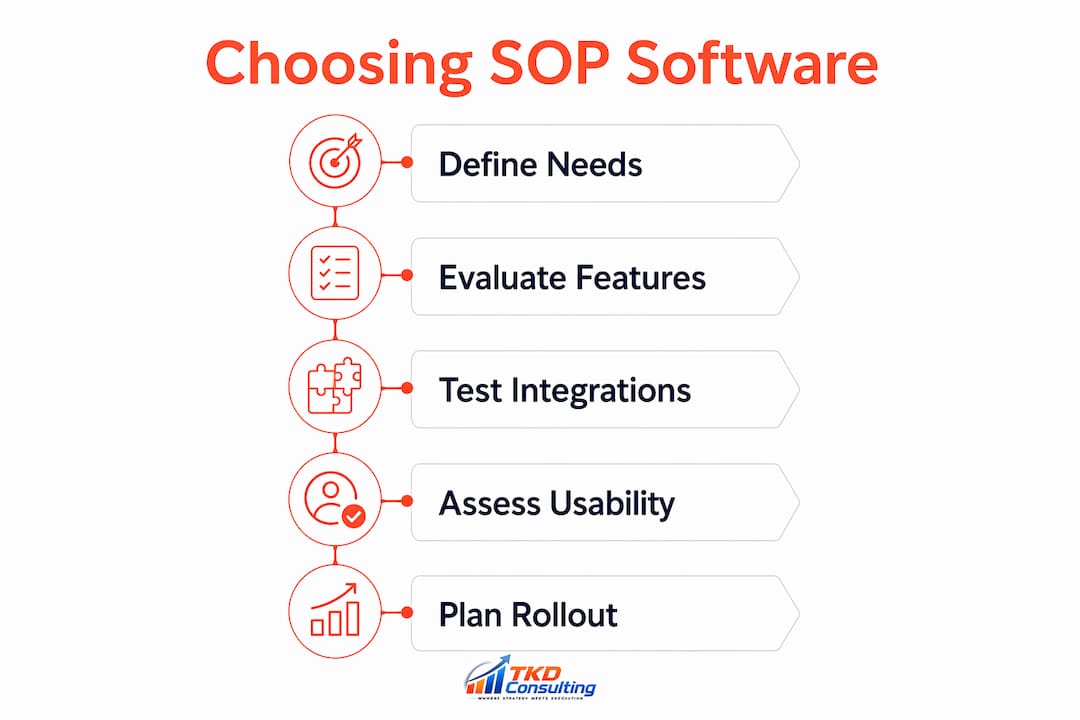
- How do you choose the right SOP management software?
- What each recommended SOP tool actually does best
- How to embed SOP software into the flow of work
- Key Takeaways
- The software is 20% of the answer
- When an operations audit beats a software trial
- Useful sources and vendor pages
How does the best SOP software compare on operational dimensions?
| Tool | Behavior layer | Integrations | Auditability | Authoring ease | Adoption features | Implementation | Pricing model | Best use case |
|---|---|---|---|---|---|---|---|---|
| Process Street | Checklists, conditional logic, approvals, signoffs | Zapier, API, native connectors | Version history, time-stamped records | Template library, doc linking | In-app assignments, reminders | Self-serve; 14-day trial | Contact vendor | Complex recurring ops workflows |
| Tallyfy | Automated task routing, decision branches | API, Zapier, webhooks | Audit log, role-based access | Visual process builder | Email/in-app nudges | Self-serve; demo available | Per-user SaaS | Process automation, handoff-heavy teams |
| SweetProcess | Step-by-step procedures, task assignment | Limited native; API available | Version control, approval history | Clean editor, AI-assisted drafting | Team assignments, deadlines | Self-serve; 14-day trial | $99/month (up to 10 users) | SMB and mid-market documentation |
| Trainual | Completion tracking, role-based paths | Zapier, HRIS connectors | Completion records, sign-offs | Curriculum builder, templates | Progress tracking, quizzes | Managed setup ($1,000 fee) | Contact vendor | Onboarding and training-first teams |
| Dozuki | Work instructions, signoffs, quality checks | ERP connectors, API | Revision control, electronic signatures | Structured guide builder | Mobile UX, step-level guidance | Managed; demo available | Contact vendor | Manufacturing, field ops, regulated environments |
Execution vs. documentation speed: Process Street and Tallyfy deliver the fastest gains for teams whose core problem is following procedures. SweetProcess and Trainual are faster to author and better for teams whose core problem is capturing or teaching procedures. Dozuki sits at the compliance end of the spectrum, built for environments where a missed step carries regulatory or safety consequences.
Statistic callout: Practitioners consistently find that behavior-layer enforcement — checklists, required signoffs, completion tracking — is the single feature that predicts whether a procedure will actually be followed, not the quality of the documentation itself.
How do you choose the right SOP management software?

Start with one decision rule: identify the failing job. Is your team failing to capture procedures, train on them, or execute them consistently? Most mid-market operations teams with a process-decay problem need execution-first tools, not better documentation.
Prioritized evaluation criteria
- Behavior enforcement — Can the tool require a checklist step before the next one unlocks? Does it log completion with a timestamp and user ID?
- Integration depth — Does it trigger from your ERP, CRM, or scheduling system, or does it live in a separate portal your team has to remember to open?
- Auditability — Does it maintain an immutable audit log, version history, and role-based access? If you operate under ISO, OSHA, or FDA constraints, this is non-negotiable.
- Authoring ease — How long does it take to build and update a procedure? AI-assisted drafting and template libraries cut that time significantly.
- Adoption features — In-app prompts, mobile UX, and automated reminders determine whether frontline staff actually open the tool.
- Pricing shape — Per-user pricing scales poorly for large hourly workforces; flat or tiered org-level pricing is usually better for field teams.
- Support model — Self-serve onboarding works for tech-comfortable teams; managed implementation matters when your ops staff has zero tolerance for a slow start.
Vendor questions to ask on procurement calls
- Does your audit trail meet ISO 9001 or OSHA recordkeeping requirements?
- Can we trigger a checklist automatically from our ERP or CRM?
- What is your API rate limit and webhook latency?
- How does version control work — can we roll back a procedure without losing completion records?
- What role-based access controls exist (author, approver, viewer, executor)?
- What is the average implementation time for a team our size?
- Do you offer a sandbox environment for testing integrations before go-live?
- How do you handle conditional logic — can steps branch based on user input?
- What does your SLA look like for support tickets?
- Can we import existing SOPs from Word, PDF, or Google Docs?
- What does pricing look like at 50, 100, and 200 users?
- Do you have case studies from companies in our industry?
- Is there a dedicated customer success manager, or is support ticket-based?
- What security certifications do you hold (SOC 2, ISO 27001)?
- What is your data residency policy for U.S.-based operations?
Red flags to watch for
- No audit trail or only a basic activity log
- No API or webhook support, forcing manual process triggers
- No conditional logic, meaning every user sees every step regardless of context
- Pricing that is completely hidden until a sales call
- No sandbox or trial environment for integration testing
- General-purpose wikis (Notion, Confluence) positioned as SOP enforcement tools — process decay is nearly guaranteed without automation and completion tracking
Pro Tip: Run a live integration smoke test during your proof-of-value. Build one real checklist, connect it to your CRM or scheduling tool, and have a frontline user complete it on their actual device. If that test takes more than two hours to set up, the tool is not ready for your environment.
What each recommended SOP tool actually does best
Process Street
Process Street converts SOPs into governed, runnable workflows with assignments, approvals, and time-stamped task records. Conditional logic lets a checklist show or hide steps based on user input, which is critical for quality control and client onboarding. The audit trail is genuinely compliance-grade.
- Strengths: conditional logic, approval gates, Zapier and API integrations, recurring workflow scheduling
- Execution fit: high — built for accountability, not just storage
- Pricing: contact vendor; no free plan; 14-day trial available
Tallyfy
Tallyfy is built around process automation and handoff reduction. Where Process Street excels at recurring checklists, Tallyfy focuses on routing tasks between people and systems automatically, reducing the manual "who does this next?" friction that kills mid-market ops teams.
- Strengths: automated task routing, decision branches, email and in-app nudges
- Execution fit: high for handoff-heavy workflows; moderate for field-level checklist enforcement
- Pricing: per-user SaaS; demo available
SweetProcess
SweetProcess keeps things clean. The editor is straightforward, version control is built in, and an AI-assisted document writer can draft a procedure from a title alone. The flat pricing model is predictable, though it may become costly for very small teams.
- Strengths: clean authoring, built-in version control, approval history, task assignment
- Execution fit: moderate — strong for documentation and organization; lighter on real-time enforcement
- Pricing: $99/month (up to 10 users); 14-day trial available
Pro Tip: SweetProcess works well as a capture-and-store layer paired with a task management tool that handles enforcement. If your team already uses a project management platform with strong assignment features, SweetProcess fills the documentation gap without duplicating your workflow.
Trainual
Trainual treats SOPs as a curriculum. Procedures are organized into role-based training paths with completion tracking, quizzes, and sign-offs. That makes it the right call for onboarding-heavy businesses, but it is not built for real-time execution enforcement on the floor.
- Strengths: structured training paths, role-based content, completion sign-offs, org chart integration
- Execution fit: high for training; low for real-time checklist enforcement
- Pricing: contact vendor; mandatory $1,000 setup fee; no free plan
Dozuki
Dozuki is the most compliance-oriented tool on this list. It is designed for manufacturing and field operations where work instructions must be version-controlled, electronically signed, and audit-ready. If your environment involves regulated processes or safety-critical steps, Dozuki's structured guide builder and ERP connectors are built for exactly that.
- Strengths: revision control, electronic signatures, mobile step-level guidance, ERP integration
- Execution fit: very high for regulated manufacturing and field ops
- Pricing: contact vendor; demo available
How to embed SOP software into the flow of work
The most common failure for SOP programs is the "static library" trap: the platform gets built out, the procedures get written, and six months later nobody opens it. Avoiding that requires a deliberate rollout sequence.
30/60/90 rollout timeline
| Phase | Timeline | Objectives |
|---|---|---|
| Pilot | Days 1–30 | Select one critical workflow; build and test the checklist; integrate with one existing system (ERP, CRM, or scheduling); assign a process owner |
| Scale | Days 31–60 | Expand to 3–5 workflows; train frontline users; establish a weekly completion-rate review; identify exceptions and update procedures |
| Govern | Days 61–90 | Automate recurring triggers; publish scorecards; assign department-level ownership; set a quarterly review cadence for procedure accuracy |
Embedding SOPs into daily operations
- Map the trigger point: identify where in your ERP, CRM, or scheduling system a process should start, and configure the integration so the checklist fires automatically.
- Assign a named process owner for every SOP, not a team or department. Shared ownership is no ownership.
- Build completion rate into your weekly ops meeting scorecard. If adherence drops below your target, the process owner explains why.
- Use exception logs to improve procedures. Every time a user skips a step or marks it not applicable, that is data about a gap in the procedure itself.
- Schedule a quarterly procedure review. Procedures that haven't been updated in 12 months are usually wrong.
When to bring in outside support: if your completion rate is below your target after 60 days, or if your team is still debating which tool to buy after two months of evaluation, those are signals that the problem is governance, not software. TKD Consulting's operations consulting practice is built for exactly that inflection point.
Pro Tip: Make the process owner someone who runs the work, not someone who manages the people who run it. A warehouse supervisor who owns the receiving SOP will update it when it breaks. A VP who owns it will not notice until the audit.
Key Takeaways
The most effective SOP software for mid-market operations teams is a behavior-first platform that enforces completion with checklists, audit trails, and system integrations rather than functioning as a static document library.
| Point | Details |
|---|---|
| Behavior layer is the deciding feature | Choose tools that require checklist completion and log who did what — documentation alone does not prevent process decay. |
| Match the tool to the failing job | Execution problems need Process Street or Tallyfy; training gaps need Trainual; documentation backlogs need SweetProcess or Dozuki. |
| Integration determines adoption | SOPs that trigger from your ERP or CRM get followed; SOPs that live in a separate portal get ignored. |
| Governance drives long-term results | Operational discipline — scorecards, cadences, named owners — is roughly 80% of SOP program success; the software is 20%. |
| TKD Consulting accelerates the path | An Operations Audit maps your process gaps and delivers a prioritized 60-day action plan before you commit to a platform. |
The software is 20% of the answer
The SOP software market is full of genuinely capable tools. Process Street, Tallyfy, Dozuki — any of them can work. What they cannot do is install the discipline that makes them work.
The teams that get real results from SOP software share one trait: someone owns the outcome, not just the tool. There is a named process owner for each procedure, a weekly meeting where completion rates get reviewed, and a leader who treats a missed SOP as a management problem, not a software problem. Without that structure, even the best platform becomes a well-organized library that nobody opens.
David Karpatkin's perspective, grounded in running warehouse operations, home services, and consumer products organizations: the software selection decision is usually the third or fourth most important decision in an SOP program. The first is identifying which processes are actually failing and why. The second is deciding who owns them. The third is building the governance cadence that keeps them current. The software choice matters, but it matters a lot less than most buyers think when they start the evaluation.
For teams that want to get the governance right before or alongside the software selection, TKD Consulting's continuous improvement programs are built around exactly that sequence.
When an operations audit beats a software trial
If your SOPs exist on paper but nobody follows them, a new platform is unlikely to fix that on its own. What you need first is a clear picture of which processes are failing, why, and what governance structure will actually sustain change.

TKD Consulting's Operations Audit is a structured, time-boxed diagnostic that maps your people, processes, and performance systems against your stated goals, then delivers a prioritized 60-day action plan your team can execute starting Monday. The audit identifies which SOP software category fits your actual failing job, which workflows to pilot first, and what scorecards and meeting cadences need to be in place before you go live. That sequence prevents the most expensive mistake in SOP programs: buying a platform, spending three months configuring it, and discovering the real problem was governance all along.
Book a paid discovery call or request the Operations Audit directly at tkdconsult.com/operations-audit.
Useful sources and vendor pages
- Process Street — SOP and workflow platform: run a checklist in the sandbox and test the conditional logic and approval workflow before committing
- SOP Software: The Best Tools by Job (Supered): practitioner breakdown of tools by failing job (capture, training, execution) — useful for matching your problem to the right category
- Acadia Software — SOP management and compliance: reference for audit trail and compliance feature requirements, especially for ISO and OSHA environments
- Waybook — AI-assisted SOP creation: test the AI drafting feature to evaluate accuracy before using it for regulated procedures
- MasterControl — regulated manufacturing SOP management: benchmark for document control and validation workflows if your environment is life-science or FDA-regulated
- Hyphenate Consulting: operations and process alignment partner for teams that need implementation support alongside software rollout